
Home / DevSpark VMS
Video management software that keeps your footage on site
DevSpark VMS reads the ONVIF and RTSP cameras you already have, records and analyses them on your own network, and does not charge you per camera. Run it under our name or your own.
First site free · No per-camera licence · UK-owned · ONVIF member · Cyber Essentials certified
Inside the platform
What your operators actually see
Screens from the running platform rather than a rendering. Every one of these is a working part of the product today.
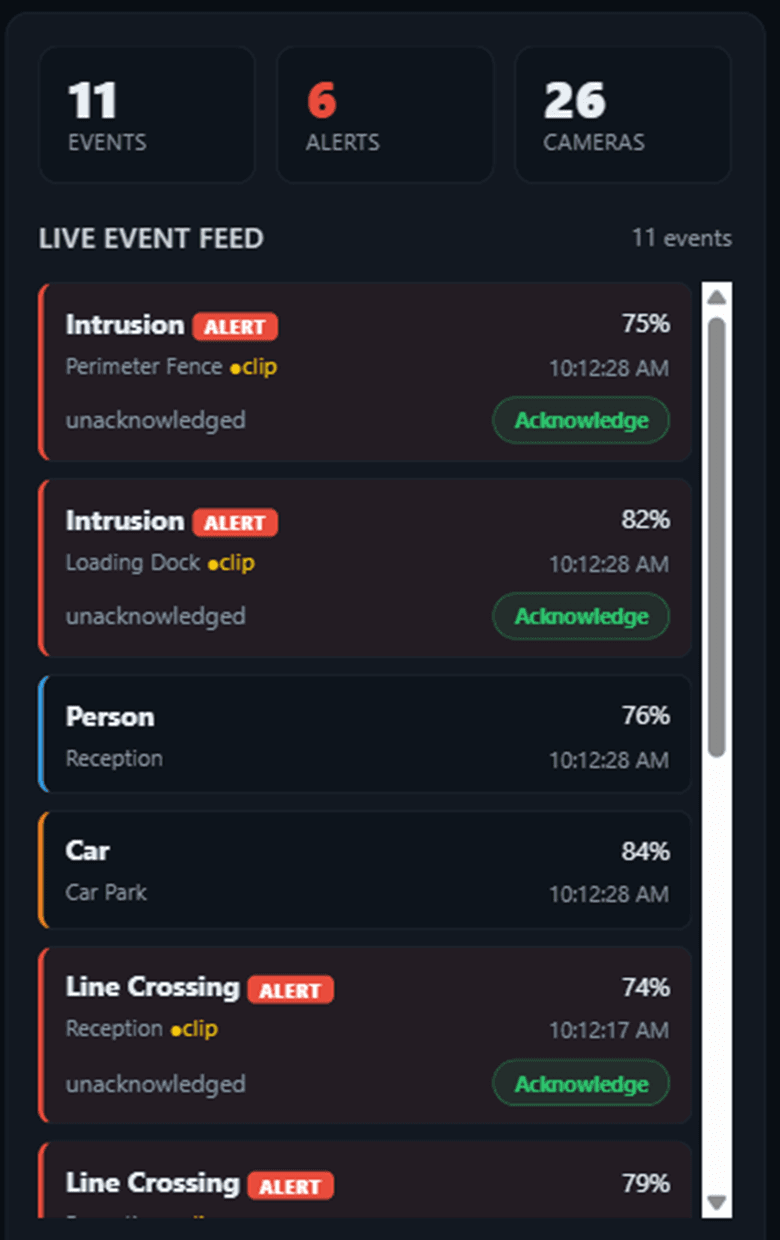
Detection is the point, not the pixel count
A camera records everything. The question an operator has is narrower: which of last night’s alerts mattered, and where is the clip. Detection runs at the edge, on the gateway in the building, so classification does not depend on the line to the internet staying up.
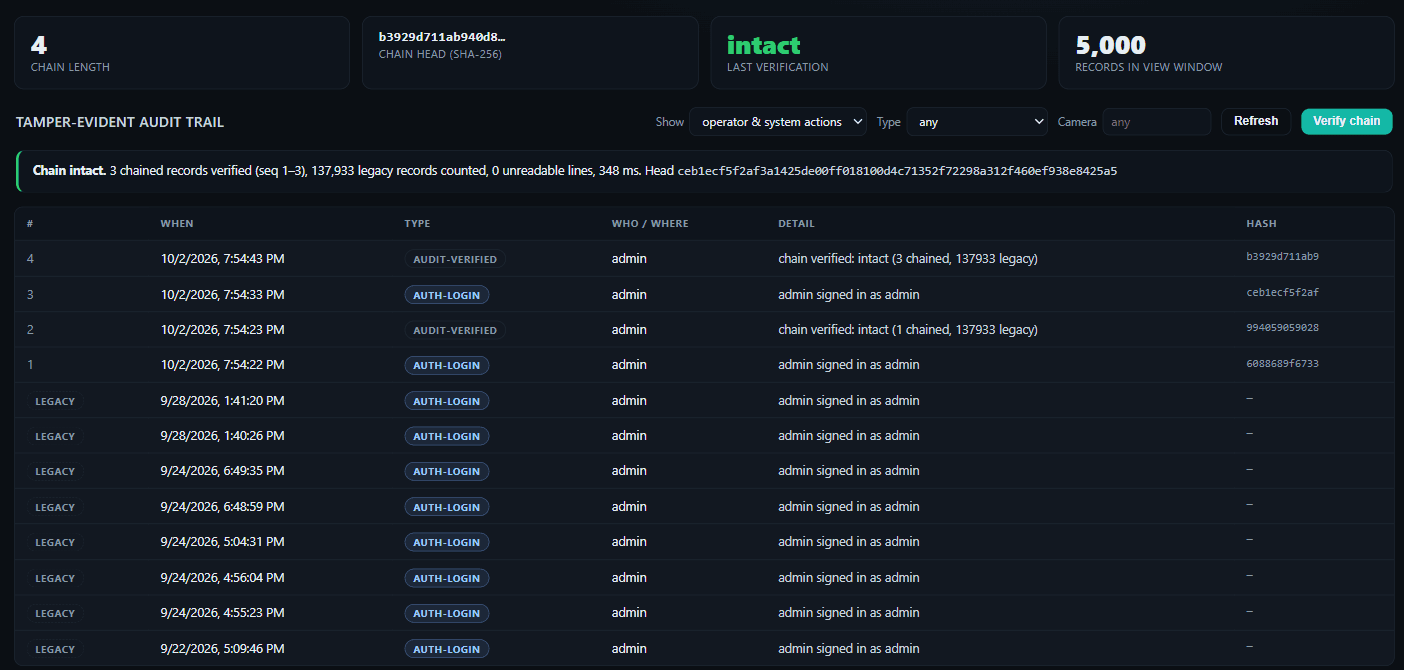
Every event carries its object class, a confidence figure, the camera and the moment, and the version of the model that produced it. That last field is what lets you answer, months later, why the system called something a vehicle — and it is written into the same append-only ledger as every operator action.
Alerts are raised and acknowledged in the control centre. Email, webhook and push delivery are in development, so an unattended site should still be reviewed by someone today.
How it is built
Six decisions the architecture makes for you
01
Your footage never reaches us
The browser pulls video straight from the gateway on your own network. Our cloud carries the interface and an index of what exists — it never receives a frame of video and never holds a camera password. When somebody asks where the footage actually goes, the answer is one sentence long.
02
No per-camera licence
Priced per site, not per device. Adding a camera to a site already running costs nothing, so the software bill stops scaling with the estate and a phase two stops being a commercial conversation.
03
Cameras already on the wall stay there
It reads cameras that speak ONVIF, and anything publishing a reachable RTSP stream, so it runs against installed hardware and alongside an incumbent system. Nothing is ripped out to trial it, which is what makes a free first site possible at all.
04
Nothing opened on the firewall
The gateway dials outbound and keeps the connection open. No port forwarding, no static IP, no VPN, and no camera exposed to the internet — which is how most CCTV estates end up indexed on Shodan.
05
Evidence, not just footage
An export is a bundle: the clip, SHA-256 hashes, the detections inside that window and the model that produced them. Every privileged action lands in an append-only ledger, including the fact that footage existed and was deleted on policy rather than simply going missing.
06
One deployment, many customers
Multi-tenant from the start, with each customer isolated from the others. Adding a site is a record rather than another installation to maintain, which is what makes running fifty of them a business instead of a workload.
The shape of it
Two pieces, and the video only travels one way
| Where | What runs there |
|---|---|
| On site | One small gateway on the same network as the cameras. It pulls RTSP, serves WebRTC, runs object detection, drives PTZ, and holds every credential. |
| The link | A single outbound, authenticated tunnel. Nothing inbound, nothing exposed, nothing for a firewall change request. |
| In the cloud | The web interface, the event index, the recording index and the audit ledger. Multi-tenant, so one deployment serves many customers and each is isolated from the others. |
| In the browser | Live wall, timeline, synchronised review, search and exports. Nothing to install, no plug-in, no client application. |
Video goes straight from the gateway to the browser. It does not pass through our cloud, so footage stays on the customer’s site, the bandwidth bill does not grow with camera count, and there is no data-residency conversation to have about recordings.
In production
What the platform does today
Every row below is built, running on real hardware, and measured against live camera firmware rather than a datasheet.
| Capability | Detail |
|---|---|
| Live view | Sub-second WebRTC, pulled direct from site. Grid of 1, 4 or 9, spotlight, fullscreen, and automatic paging when there are more cameras than tiles. |
| Codecs | H.264, H.265 and AV1 ingested and decoded at full sensor resolution against live firmware — including 2592×1944 at 30fps and 3840×2160 at 25fps. |
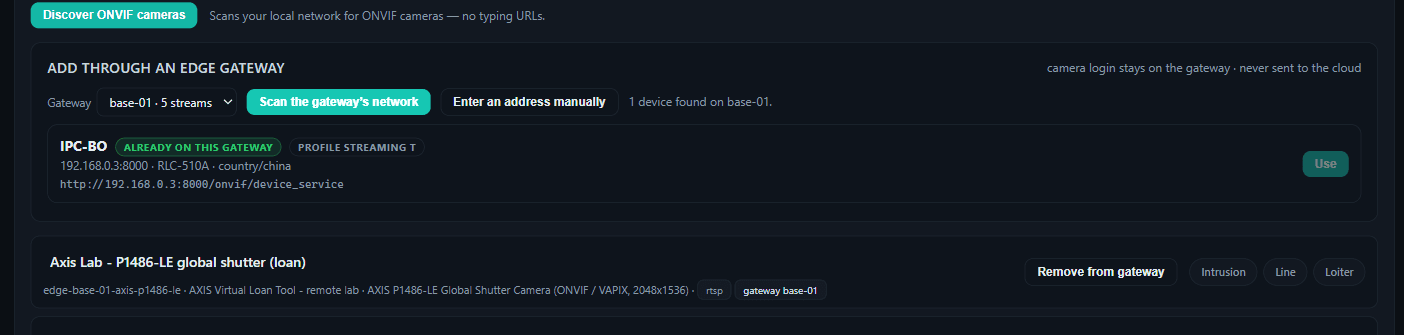
| ONVIF discovery | Scans the gateway’s own network and onboards what it finds, so a camera is added by selecting it rather than by typing an RTSP URL. Credentials are written to the gateway and never leave the customer’s building. |
| PTZ | Pan, tilt and zoom over ONVIF and vendor APIs, with the camera’s own telemetry read back as confirmation. Relative moves land within a hundredth of a degree of the angle commanded. |
| Object detection | People, vehicles and objects classified at the edge, with confidence recorded against every detection and the model version stamped on the event. |
| Thermal and bispectral | Devices exposing two image sources are ingested as two independent streams, because a thermal sensor and a visual sensor differ in resolution and an operator wants either on the wall alone. |
| Audio | Listen on one camera at a time, transcoded on demand where a camera publishes a codec the browser cannot carry. |
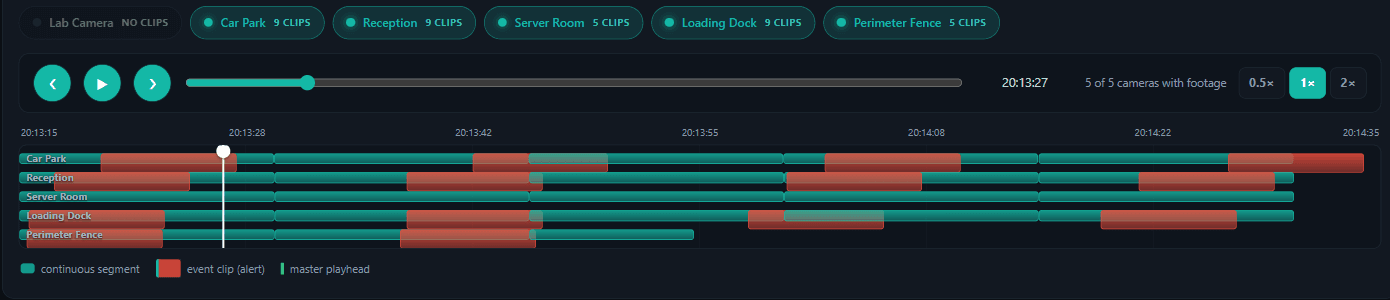
| Review | Scrubbable timeline with alert markers, playback at 0.5× to 2×, and synchronised multi-camera review locked to a single clock so you can follow someone across a site. |
| Search | Find footage by object class, camera, time window and confidence, then jump straight to that moment in the timeline. |
| Site map | Every camera plotted on a schematic plan of its site, coloured by live health, with field of view and a jump straight to that camera on the wall or in playback. |
| Evidence export | Clip download, or a bundle carrying SHA-256 hashes, the detections inside that window and model provenance. |
| Retention | Per-camera retention in days with an automatic sweep, and a ledger entry recording that footage existed and was deleted on policy rather than simply being unavailable. |
| Access control | Viewer, operator and admin, enforced server-side rather than hidden in the interface, with every privileged action written to an append-only audit ledger. |
| White-label | Your logo, colours, domain and company name throughout, applied as a configuration record rather than a forked build. |
What is coming
The capability landing next
Published on the same page as the list above, because a partner planning a deployment needs to know what arrives next as much as what works now — and because we would rather you held us to a date than discovered a gap.
| Capability | Where it stands | Stage |
|---|---|---|
| Scheduled 24/7 recording | Operator-initiated recording and per-camera retention run today. Round-the-clock segmented capture on a schedule is the next release. | Next release |
| Outbound alerting | Alerts are raised, classified and queued for acknowledgement in the control centre today. Email, webhook and push delivery extends that off-screen. | In development |
| Analytics rules on live streams | Intrusion zones, line crossing and loitering run across recorded review today. The same rules applied continuously to live feeds is the next step. | In development |
| ANPR and face recognition | Object detection is built and running — people, vehicles and object classes, with a confidence figure and the model version stamped on every event. Plate and face recognition extend that same edge pipeline rather than replacing it. | Roadmap |
| Native mobile applications | The interface runs in any modern phone browser today, with no plug-in. Native iOS and Android clients add push and background alerting. | Roadmap |
| Redaction and subject access export | Evidence bundles and the audit ledger are built. Automated blurring and a one-click subject access request bundle build on top of them. | Roadmap |
What it costs
Two pricing models, and why the numbers look so different
There are two ways this market prices, and they are not comparable without knowing what each one buys. Cloud platforms charge per camera per month, typically $15 to $25, roughly £140 to £235 per camera per year, and that price includes cloud video storage, which is the expensive part. On-premise platforms charge a perpetual device licence, commonly around £85 a camera, plus support, and you supply the storage.
DevSpark VMS is priced per site, working out near £30 per camera equivalent per year at launch pricing. Across a 120-camera estate over five years:
| Model | Where the footage lives | 120 cameras, 5 years |
|---|---|---|
| Cloud VMS, mid tier | Their cloud, rented — 30 days | ~£141,000 |
| Cloud VMS, entry tier | Their cloud, rented — 14 days | ~£85,000 |
| On-premise device licences | Your hardware, bought separately | ~£10,200 plus support |
| DevSpark VMS | Your own site, owned outright | ~£18,000 |
The caveat, because the comparison means nothing without it. Our figure excludes storage, because footage never leaves the building. The customer buys an appliance and disks once and owns them, rather than renting space that disappears when the subscription stops. A different shape, not simply cheaper.
This is launch pricing, held deliberately low while we build out reference deployments. Partners who start now keep the rate they started on. Figures are list, before normal distribution discounting, at current exchange rates.
Camera compatibility
A compatibility matrix that includes the failures
Most platforms answer “which cameras?” with a wall of logos. We keep a record of every model actually put through DevSpark VMS, with the measurements taken against live firmware: negotiated resolution and frame rate, codecs ingested, PTZ angles commanded and the position the camera reported back afterwards.
It also records what is not proven on each device, and names hardware we would not put in front of a public-sector buyer along with the reason why. That second half is the point: a compatibility list containing only good news tells you nothing about the one camera you are worried about.
For installers and integrators
Run it under your own name
DevSpark VMS rebrands completely: your logo, your colours, your domain, your company on the login screen and in every system email your client receives. To the end customer it is your software, supported by you, and we stay behind you.
That is a commercial arrangement rather than a cosmetic one. The recurring revenue stays with your business instead of the renewal invoice going from a platform vendor directly to your client, which over enough cycles is how the relationship moves too. And we are a software company: we cannot hold NSI or SSAIB approval and never will, so the platform only reaches an estate through a firm that does.
One thing this is not: under this arrangement the software stays ours and you licence it. If you would rather commission a platform and own the intellectual property outright, that is a different and larger engagement — we do that too. Most firms are better off proving the demand on a licensed platform first.
The commercial case for dropping per-camera licensing is argued in full on why a VMS should not be licensed per camera.
Getting started
Four steps, and you can stop after any of them
01
Twenty minutes
We show it running on real cameras rather than slides, and you tell us where it would fail on the estates you actually look after.
02
Pick one site
One client, one gateway, cameras they already have — running alongside whatever is there now.
03
We commission it free
No cost to you or to them, done with your engineer so your team learns it on a live system instead of a manual.
04
Decide in the open
If it is not right it comes out and nothing is owed. If it is, we agree per-site pricing and you keep the client.
Questions we get asked
Straight answers, including the awkward ones
What is a VMS, and how is DevSpark VMS different?
A video management system is the software layer above the cameras: it ingests the streams, records them, shows operators a live wall, and makes recorded footage searchable and exportable as evidence. Most are licensed per camera and either run on a server you maintain or push all your footage into a vendor’s cloud. DevSpark VMS is licensed per site, and keeps recording and detection on an appliance inside the customer’s own building while the interface is delivered from the cloud. You get the operational model of a cloud platform without handing over the footage or the bandwidth bill.
What does DevSpark VMS cost?
Per site, per year — not per camera — which works out near £30 per camera equivalent at launch pricing. Cloud VMS platforms typically charge $15 to $25 per camera per month, around £140 to £235 a year, though that includes cloud storage and ours does not, because footage stays on the customer’s own site. On-premise platforms licence per device, commonly around £85 a camera, plus support. The first site is free while you evaluate it.
Why is it so much cheaper than cloud VMS platforms?
Because we are not storing your video. A cloud platform’s subscription rents you storage in their data centre, which is the expensive part and which stops the day you stop paying. Our architecture keeps footage on an appliance in your building, so you buy disks once and own them. It is a different shape rather than simply a lower price.
Which cameras does it work with?
Any camera conformant to ONVIF Profile S or T, and anything else publishing a reachable RTSP stream. We keep a written compatibility matrix of every model actually put through the platform, with measurements taken against live firmware rather than datasheets. It also records what is not proven on each device and names hardware we would not put in front of a public-sector buyer, with the reason. Ask and we will send it — it is not a marketing document.
Can it replace our existing NVR or DVR?
It runs alongside one first, which is the point of a free first site — nothing is removed to evaluate it. The gateway reads the same cameras your recorder is reading, so both can run on the same estate while you compare them. Where an estate then decides to retire the recorder, recording continues on the gateway appliance and the cameras are untouched, because they were never bound to the recorder in the first place.
Can it carry our brand instead of yours?
Yes. Your logo, your colours, your domain and your company on the login screen and in front of your client. Branding is a configuration record rather than a forked build, so your instance is never a stale copy waiting on us to merge something. Your client need not know we exist, and we will not approach them.
Who supports the end customer?
You do, because you installed it — and we support you. That is the honest shape of the arrangement. Any vendor promising to answer your client’s phone is either overpromising or planning to own that client eventually.
What analytics run on the video?
Object detection, running at the edge on the gateway in the building rather than in a data centre: people, vehicles and object classes, with a confidence figure and the version of the model stamped on every event, and intrusion zones, line crossing and loitering across recorded review. Number plate and face recognition are on the roadmap and extend the same pipeline. Ask us where a specific analytic stands before you write it into a specification and we will tell you in writing — that answer is worth more to both of us than a brochure claim.
Is DevSpark VMS ONVIF conformant?
DevSpark Ltd is an ONVIF member, and the platform interoperates with cameras that are themselves ONVIF conformant, using the published specifications for discovery, streaming and PTZ. The platform itself has not been through ONVIF conformance testing and carries no Profile claim of its own, so if a specification demands a conformance-tested VMS we would tell you before you wrote us into a bid.
Where does the data live?
Recording stays on the appliance on the customer network. The cloud layer provides the interface, identity and an index of what exists, and never receives camera credentials. DevSpark Ltd is UK-owned, and the platform is designed, built and supported from Manchester.
Put it on one site and judge it against what you use now
We commission the first one free, alongside whatever is already there, branded however you want it. If it is not right you take it out and nothing is owed.
Engineer to engineer. No handoffs.